¶ Video Tutorials
- YouTube video guide: https://www.youtube.com/watch?v=X307oOWnYZI
¶ 1. Pre-Installation: Tools and Preparation
Before beginning the physical setup, ensure you have the following tools (not included in the package) and meet the environmental requirements:
¶ 1.1 Required Tools
- Electric Drill (8mm bit): Required for drilling holes for the wall expansion bolts if choosing vertical mounting.
- Level: To ensure the brackets and battery stack are perfectly horizontal.
- Insulating Gloves: Highly recommended for personal safety during cable handling.
¶ 1.2 Site Selection Standards
- Environment: Install the unit in a well-ventilated, shaded area. Avoid direct sunlight, persistent rain, and proximity to flammable materials.
- WIFI Connection: Make sure the Device is within the Wi-Fi coverage area.
- Clearance: To ensure proper ventilation, efficient heat dissipation, and reliable wireless communication, please maintain ≥ 15cm from the antenna to the wall and ≥ 5cm above the heat fins.
- Cable Distance: Ensure that the SolarFlow 2400 AC+ is installed within the length range of the solar panel cables and the 3m AC connection cable.
- Surface: The floor must be solid and level to support the main unit (27.8kg) and up to five expansion batteries.
To avoid wiring errors, identify the functional ports on the main unit: SolarFlow 2400 AC+ Hardware Overview
¶ 2. Hardware Assembly Sequence
¶ 2.1 Battery Stacking
- Cover removal: Peel off the silicone protective covers from the battery terminals on the main unit and the AB1000/AB2000/AB3000L battery modules.
- Alignment & Add-on: Align the main unit's bottom terminal with the battery's top terminal and lower it carefully (Do not touch the metal pins of the ports with your hands or other objects).
- Connection confirmation: Press down firmly until you hear a clear "Click" sound, indicating the interfaces are fully locked.
- Capacity: You may stack up to 5 additional batteries for a maximum of 16.8kWh.
¶ 2.2 Mechanical Stabilization
- Attach the side brackets to the SolarFlow 2400 AC+ main unit using the M4 screws.
- Position the stack against the wall, mark the hole locations through the bracket slots, and drill using an 8mm bit.
- Insert the self-sealing expansion bolts to fix the system firmly to the wall
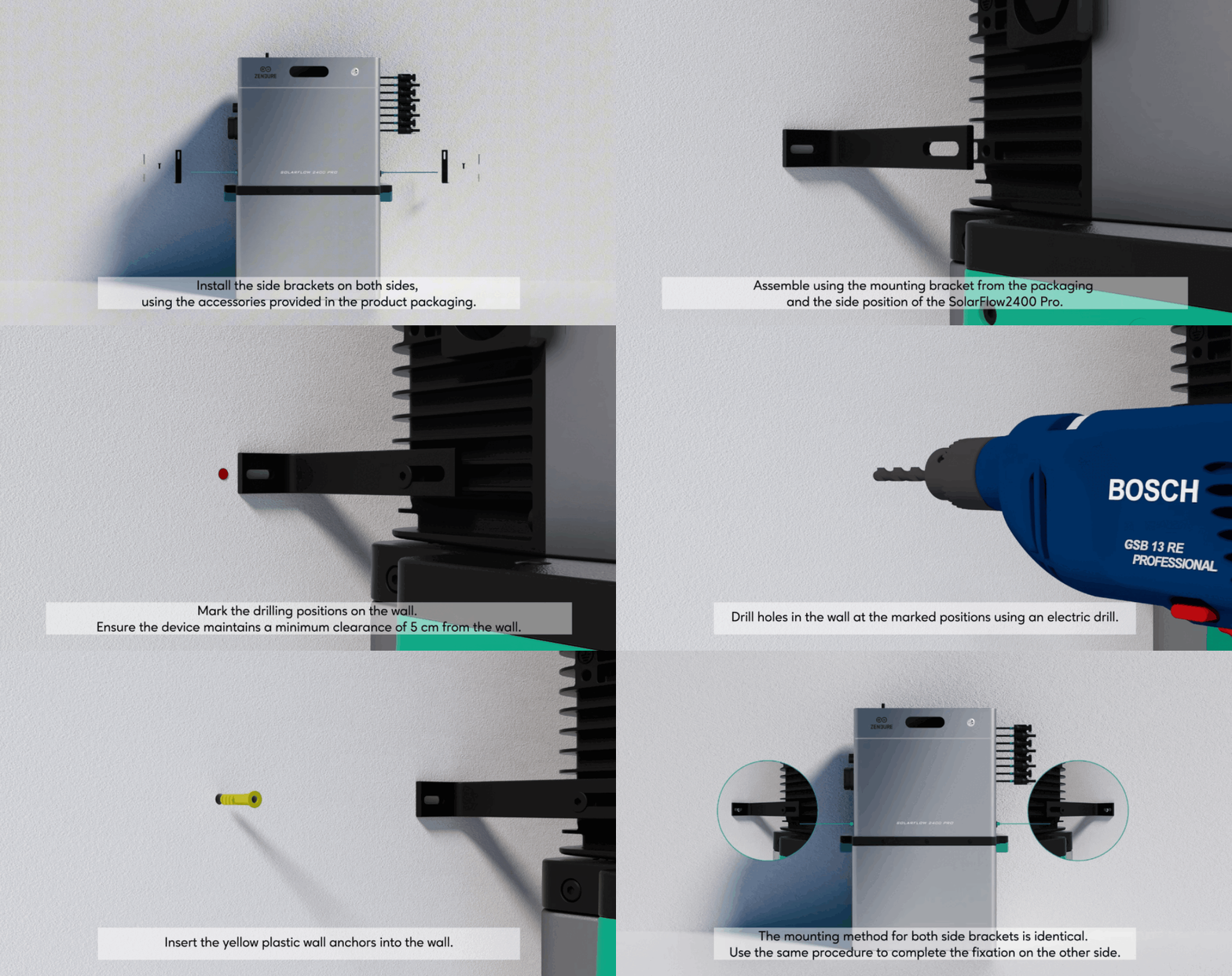
secure the system to the wall
¶ 3. Electrical Integration
¶ 3.1 Grid (AC) Connection
- Cable Setup: Plug the 3m 16A AC cable into the unit's upper AC port.
- Dedicated Socket: Plug the other end into a standard household wall socket.
- Cable Management: Make sure the solar and AC cables can run straight down without significant bending.
- Avoid Power Strips: With the device installed on a dedicated circuit, it shall serve as the sole power source other than the utility.The dedicated circuit shall not be shared with any other sources or utilization equipment, except equipment connected downstream of the device.
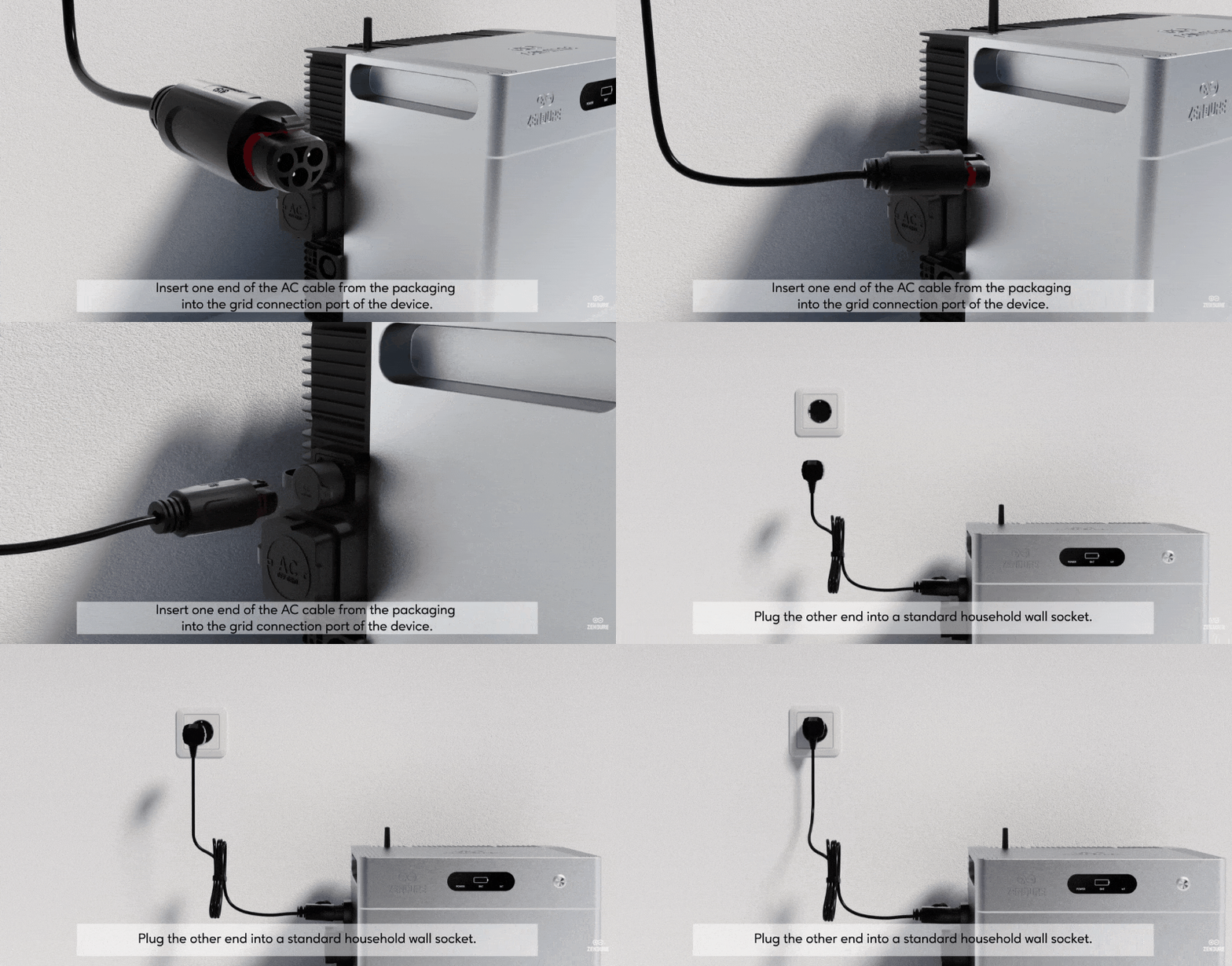
[!Note]
The inverter is set to a default output power limit of 800W. If you need to exceed this limit, please have a licensed electrician visit your location to assess the safety of your circuit and ensure it complies with safety standards. After the electrician’s verification, you can apply to increase the power to 2400W via the Zendure App. Please see this page for detailed steps.
¶ 3.1.1 Single SolarFlow 2400 AC+ Wiring Diagram
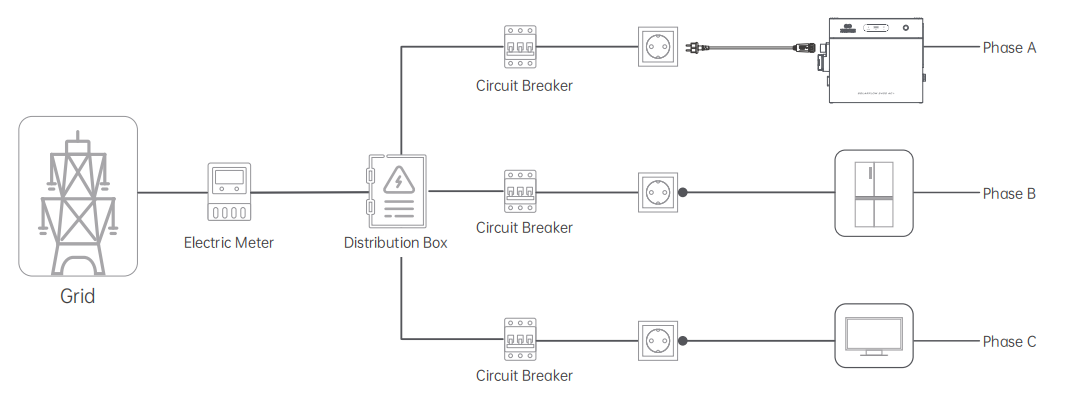
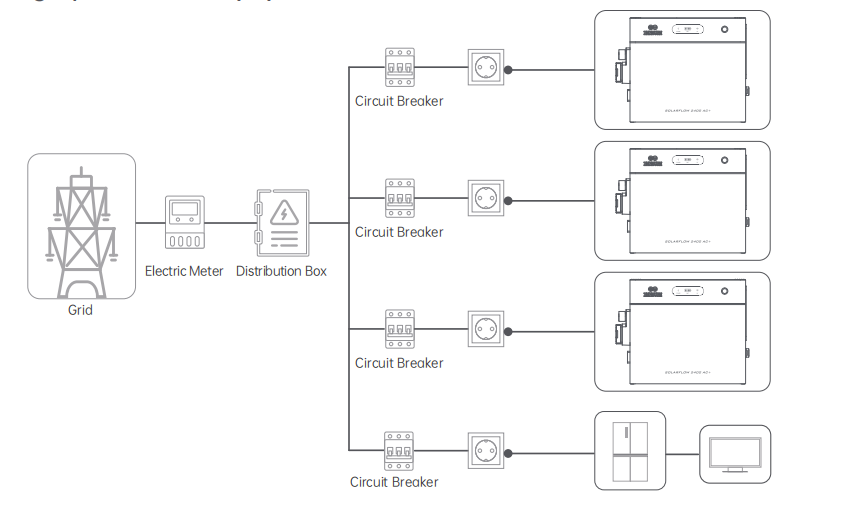
¶ 3.1.2 Multiple SolarFlow 2400 AC+ Wiring Diagram
| Installation in single-phase electricity system | Installation in three-phase electricity system |
 |
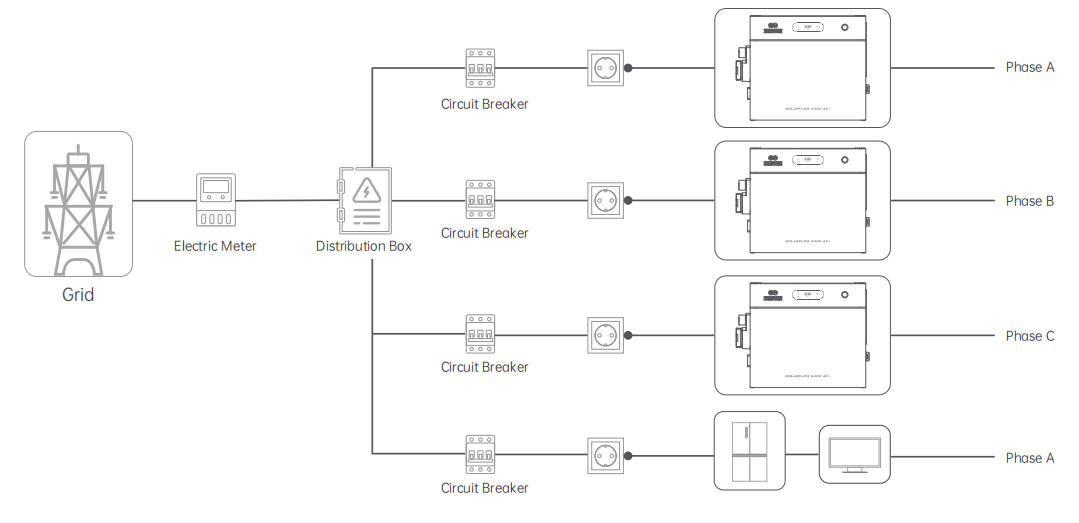 |
| Connect the inverter to a socket on the dedicated circuit, without any other appliances sharing the same circuit. Press and hold the button for 2 seconds to power on each inverter. | Connect each inverter to a socket on a dedicated circuit for each phase, ensuring no other appliances share the same circuit. Press and hold the button for 2 seconds to power on each inverter. |
- Each device’s peak power can reach 2400W. Connecting multiple devices to the same circuit can cause the circuit to overload, leading to potential safety risks.
- If your home does not have the required sockets and circuits, or if you lack the electrical knowledge to accurately identify whether these sockets or circuits meet the requirements, please request the assistance of an electrician. It is recommended to connect each device directly to a separate breaker. For detailed instructions, refer to this page.
- The total maximum output power of all devices is set to a default of 800W. If you need to exceed this limit, please invite an electrician to your home to ensure your wiring is safe and does not exceed the circuit load, or follow the installation guidelines in this page to connect each device directly to the breaker.
Next, you need to complete the device software connection on the app: SolarFlow 2400 AC+ Software Setup Guide